
Minecraft mods can seem very overwhelming and remembering the order to install everything can be a real chore. Then add SMP into the mix and it gets even worse. I’ve compiled these few steps to get a small list of client-side mods and a texture pack installed that work with most, if not all, SMP servers. This guide is for Windows but can easily be adapted to Linux or OSX.
- Note: MCPatcher, HD Texture Patch, or any other mod not listed in the guide below is *not* required regardless of what the information in the links say.
- Backup your “%AppData%\.minecraft” folder.
- Delete your “%AppData%\.minecraft” folder.
- Download Minecraft.exe if you don’t already have it.
- Run Minecraft.exe and log in.
- Once you get to the main menu, exit the game.
- Download Magic Launcher.
- Download Risugami’s ModLoader.
- Download OptiFine.
- Personally, I use the “Multi-Core” version.
- Download Faithful 32×32.
- Move the Faithful 32×32 zip file to “%AppData%\.minecraft\texturepacks“.
- Run Magic Launcher.
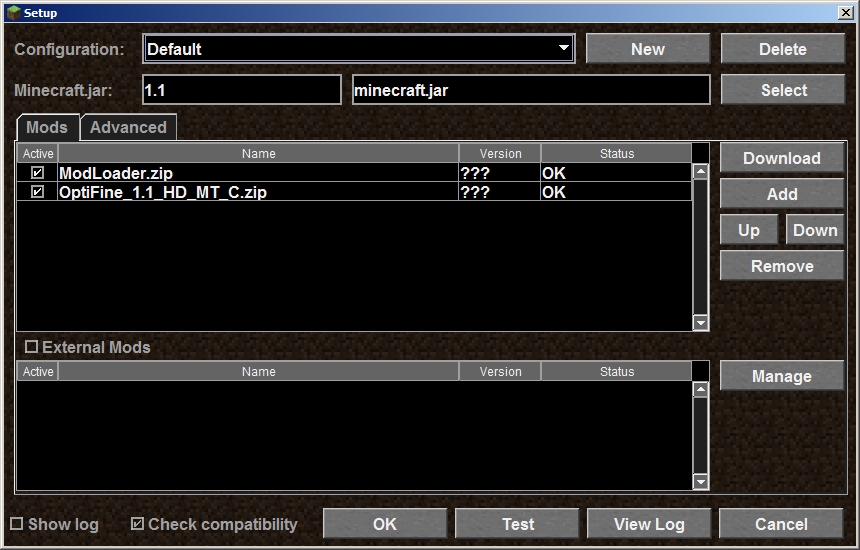
- Click Setup
- Click Add
- Select the zip files that contain Risugami’s ModLoader and OptiFine.
- Click Open
- The mods should be ordered the same as the screenshot below.
- Click OK
- Continue logging in with Magic Launcher.
At this point you should have your old Minecraft install backed up, a fresh copy downloaded/installed, and ModLoader, OptiFine, and Faithful 32×32 installed.