
Minecraft mods can seem very overwhelming and remembering the order to install everything can be a real chore. Then add SMP into the mix and it gets even worse. I’ve compiled these few steps to get a small list of client-side mods and a texture pack installed that work with most, if not all, SMP servers. This guide is for Windows but can easily be adapted to Linux or OSX.
- Note: MCPatcher, HD Texture Patch, or any other mod not listed in the guide below is *not* required regardless of what the information in the links say.
- Backup your “%AppData%\.minecraft” folder.
- Delete your “%AppData%\.minecraft” folder.
- Download Minecraft.exe if you don’t already have it.
- Run Minecraft.exe and log in.
- Once you get to the main menu, exit the game.
- Download Magic Launcher.
- Download Risugami’s ModLoader.
- Download OptiFine.
- Personally, I use the “Multi-Core” version.
- Download Faithful 32×32.
- Move the Faithful 32×32 zip file to “%AppData%\.minecraft\texturepacks“.
- Run Magic Launcher.
- Click Setup
- Click Add
- Select the zip files that contain Risugami’s ModLoader and OptiFine.
- Click Open
- The mods should be ordered the same as the screenshot below.
- Click OK
- Continue logging in with Magic Launcher.
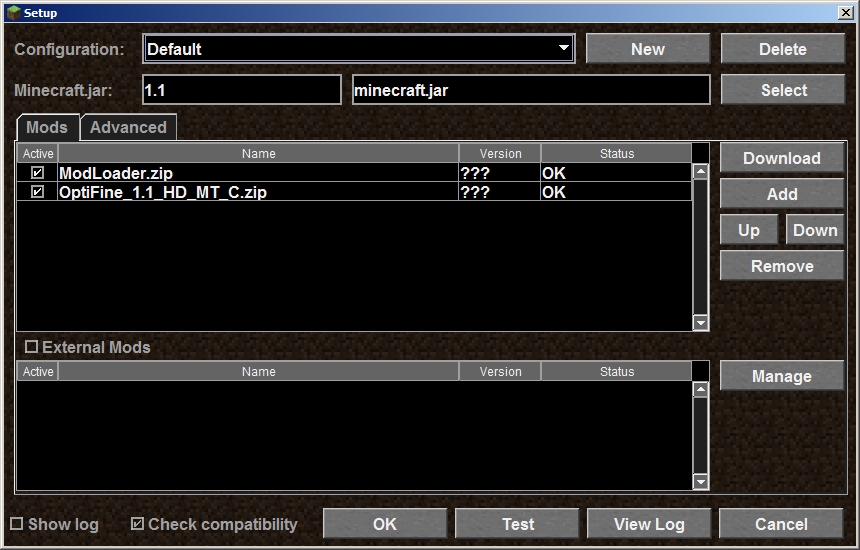
At this point you should have your old Minecraft install backed up, a fresh copy downloaded/installed, and ModLoader, OptiFine, and Faithful 32×32 installed.


6 comments
4 pings
Skip to comment form
Modding can always be a bit dangerous, I’ve had to ask mates for the latest minecraft.jar because I haven’t backed it up a few times.
Thanks for the good read, you should check out my server some time, http://minecraft.lolnet.co.nz
its working awmseoe for me besides when i went into to many items to spawn a few things there sum wierd leather helmets the item ids are 2361,2366,2369,2371 and there all un named
You can\’t shouldn\’t have etxarcted the minecraft.jar, just opened it up with an archiver program.To fix it, just delete the bin folder and start minecraft. It will automatically download a new bin for you, and you will still have your texture pack completed. Hope this helps!
Can you make a golden tipepd diamond pickaxes because gold is the fastest miner but the weakest so it would in my opinion be awesome and also if you do like it you should bump up the the Normal mining value so it just better so it mines coal etc faster and if you do like it should be expensive because gold is a really fast stone miner
The textures for the chest and grass won’t chagne! what shall I do? The chest isn’t that important, but the default grass is ruining my whole Texturepack.. I don’t even know where I find it -.-Also, I can’t find the redstone wire texture. Please help!
This seems like a really amnziag server mostly because I’m not a great build but I can help with anything. Also I don’t know how to make a server but I’d love to be part of the YOUR big exciting server P.S. I love Air nation.
[…] to Get the Classic Start Menu in Windows 8 With Metro Cheat AppMinecraft Client-side SMP Friendly Modding ul.legalfooter li{ list-style:none; float:left; padding-right:20px; } .accept{ display:none; […]
[…] Mod: Creepers on a PlaneMinecraft MobDisguise v1.3 Plugin (No Client Mod)Minecraft CollectionMinecraft Client-side SMP Friendly Modding ul.legalfooter li{ list-style:none; float:left; padding-right:20px; } .accept{ display:none; […]
[…] SurvivalHow to get skins for your minecraft guy cracked(offline or online) for freeMinecraftMinecraft Client-side SMP Friendly Modding ul.legalfooter li{ list-style:none; float:left; padding-right:20px; } .accept{ display:none; […]
[…] powerVideo: Minecraft Tutorial World “Retirement Tour”Minecraft Weekly RoundupMinecraft Client-side SMP Friendly ModdingMinecraft Survival Island EP 003 – EPIC BATTLE! – Ft Fragtasmic & […]